


Pokémon FireRed: Rocket Edition v1.0.2 Cheats & CodeBreaker Codes
Looking for working Pokémon FireRed: Rocket Edition cheats? This guide covers the most requested codes for Rare Candy, Master Balls, unlimited money, walking through walls, guaranteed catches, unlimited PP and more—plus the correct cheat type and safer activation instructions for popular GBA emulators.
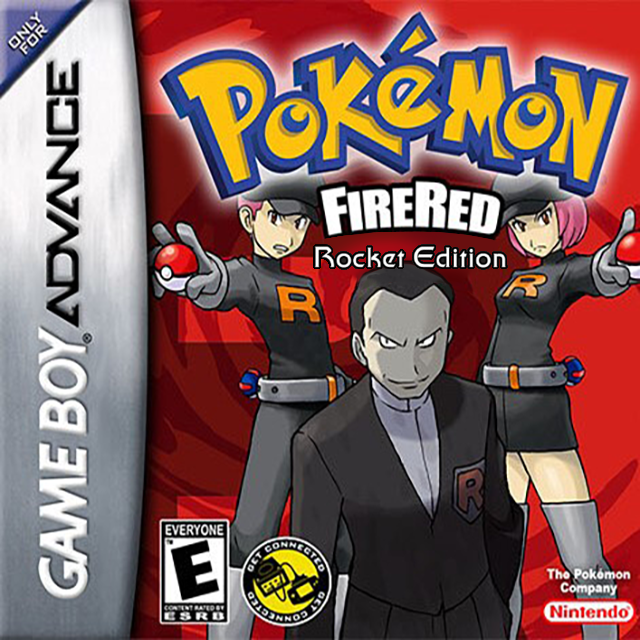
Rocket Edition v1.0.2 compatibility
Rocket Edition is applied as a patch to a clean, legally obtained Pokémon FireRed game. Because it retains much of FireRed’s underlying structure, several familiar FireRed v1.0 codes work—but a ROM hack can move or replace data. That is why every block below shows its correct format and why you should test one code at a time.
Quick Rocket Edition cheats list
| Cheat | Format | How it activates | Compatibility note |
|---|---|---|---|
| Rare Candy | CodeBreaker | Withdraw from item PC | FireRed-base code |
| Master Ball | CodeBreaker | Withdraw from item PC | FireRed-base code |
| Unlimited Money | GameShark / Action Replay | Requires separate master code | Rocket Edition reported |
| Walk Through Walls | GameShark / Action Replay | Works while enabled | Widely recorded |
| 100% Catch Rate | GameShark / Action Replay | Throw a Poké Ball | Rocket Edition reported |
| No Wild Encounters | GameShark / Action Replay | Works while enabled | Rocket Edition reported |
| Unlimited PP | CodeBreaker | Works in battle | FireRed-base code |
What “reported” means: the code appears in Rocket Edition-focused testing lists. “FireRed-base” means the code uses an address inherited from the original FireRed v1.0 structure. Neither label guarantees compatibility with repatches, unofficial translations or other Rocket-themed hacks.
Pokémon FireRed: Rocket Edition cheat codes
Put the cheat’s title in your emulator’s name box and paste only the hexadecimal lines into its separate code box. Each copy button below copies the raw code—not its heading.
Unlimited Rare Candy
CodeBreaker • Item PC82025840 0044
Use: enable the code, open a Pokémon Center PC and withdraw Rare Candy from item storage. Disable it immediately after taking what you need.
Important: this modifies the first item-PC slot. Leaving it enabled can repeatedly overwrite that slot.
Unlimited Master Balls
CodeBreaker • Item PC82025840 0001
Use: open item storage at a Pokémon Center PC and withdraw the Master Balls. Turn the cheat off before storing or rearranging other items.
Rare Candy and Master Ball use the same memory address. Never enable both together.
Unlimited Money
GameShark / Action Replay • Master code required3AF85ACA C4D18CEC 8E883EFF 92E9660D 29C78059 96542194
Use: preferably create two entries: the first two lines as “Money Master Code” and the final line as “Unlimited Money.” Enable the master first, then the money entry. Visit a Poké Mart to check the result.
The copy button includes both blocks for convenience. They should still be separated into the emulator’s two cheat entries.
Walk Through Walls
GameShark / Action Replay509197D3 542975F4 78DA95DF 44018CB4
Use: enable only when you need to pass an obstacle, then disable it before entering doors, stairs or scripted scenes.
High-risk navigation code: crossing map boundaries can strand the player, skip story flags or place you on invalid tiles. Make an in-game save backup first.
100% Catch Rate
GameShark / Action Replay87ACF659 707466DC 8BB602F7 8CEB681A
Use: enable before throwing a ball in a standard wild encounter. Disable after the capture.
Rocket Edition’s stealing system is story-driven. Do not assume this code bypasses the hack’s theft restrictions or rank requirements.
No Wild Pokémon Encounters
GameShark / Action ReplayD41DD0CA 33A629E5 8E883EFF 92E9660D
Use: enable while travelling through grass, caves or water, and switch it off when you want encounters again.
One-Hit Knockout
GameShark / Action Replay95EDFBBA A5A72A78 C833D1A0 02FA7205
Use: enable for an ordinary battle and land a damaging move. Disable before scripted fights or encounters you intend to catch or steal.
Unlimited PP
CodeBreaker42023C08 6363 00000002 0002
Use: enable during normal play to prevent party moves from running out of PP. Disable if move values or menus display incorrectly.
Maximum Stats — first party Pokémon
CodeBreaker • Permanent-value warning420242DA 03E7 00000007 0002
Use: place the intended Pokémon in party slot one before enabling. Open its summary to refresh the values, then disable the code.
This can create abnormal statistics and may permanently alter the Pokémon after saving. Use it only on a backed-up save.
How to enter Rocket Edition cheats
- Confirm your game. It should be ColonelSalt’s completed FireRed: Rocket Edition v1.0.2—not DragonsDen’s Emerald-based project.
- Make a real save backup. Copy the emulator’s .sav file somewhere safe. A save state alone can preserve the same corrupted memory.
- Open the emulator cheat menu. In My Boy!, VBA-M, mGBA or another compatible emulator, create a new cheat entry.
- Select the format shown above. Choose CodeBreaker for item-PC and PP codes; choose GameShark/Action Replay for the encrypted eight-character blocks.
- Keep names and codes separate. Put “Rare Candy” in the title field and only
82025840 0044in the code field. - Test one code at a time. Load gameplay, perform the stated trigger, confirm the result and switch the cheat off before saving.
Rocket Edition cheats not working?
Nothing happens
Check that the entry is enabled, confirm its CodeBreaker or GameShark format, and perform its trigger. Item codes appear in the Pokémon Center item PC—not automatically in the Bag.
The code is rejected
Remove its title from the code box and check spacing. Some free emulator versions require each line of a multi-line block to be added separately.
The game freezes
Disable every code, restart from an unmodified in-game save and retest a single entry. Do not stack item modifiers or use walls/OHKO codes during scripted events.
The code works on FireRed but not here
Rocket Edition is a ROM hack, so not every original FireRed address remains compatible. Also verify that you patched the intended clean base and are running the completed v1.0.2 release.
Rare Candy or Master Ball is missing
Open the item-storage section of a Pokémon Center PC. Toggle the code before entering the PC and withdraw the item; do not look only in the Bag.
Money still looks unchanged
Create the master and money portions as separate GameShark entries, enable the master first, then enter a Poké Mart and test a purchase.
Pokémon FireRed: Rocket Edition cheat FAQ
What version does this page support?
The intended target is ColonelSalt’s completed Pokémon FireRed: Rocket Edition v1.0.2. Other translations, repatches and similarly named Team Rocket games can use different addresses.
Are Rocket Edition and DragonsDen’s Team Rocket Edition the same?
No. ColonelSalt’s Rocket Edition is based on FireRed and focuses on a parallel Kanto story. DragonsDen’s project is a separate Emerald-based game with different regions, releases and cheat compatibility.
Do Rare Candy and Master Ball need a master code?
The listed item-PC CodeBreaker entries normally do not. Enable one item code, withdraw the item from a Pokémon Center PC and disable it before using the other.
Can I use several cheats together?
It is safer not to. Codes may write to overlapping addresses, and ROM hacks can behave differently from the original game. Use one, obtain the result, disable it and confirm the save still loads.
Is there a working complete Pokédex or all-badges cheat?
This guide does not recommend them. Rocket Edition changes normal FireRed progression and does not use every original feature in the same way; forcing major story or Pokédex flags can break the intended campaign.
Does CheatCodeDB provide the game ROM?
No. This guide provides compatibility information and cheat codes only. Use the creator’s patch with a clean game copy you legally own; do not download or share copyrighted ROM files.
0 comments:
Post a Comment
Did these cheat codes work for you? Leave a comment with your game version, region and emulator or cheat device. If something didn’t work, tell us which code you tried. Your feedback helps us verify codes and improve this guide.